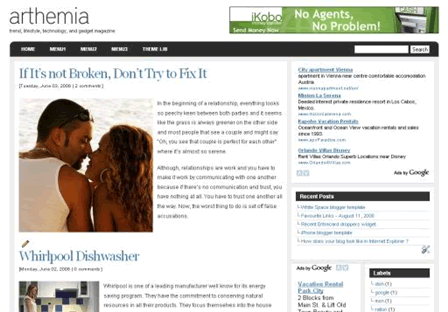
Preview | Download
Features
- Two/Three columns depend on your customization
- Professional design with magazine style
- Built-in search box
- Nice drop down menu
- Three footer widgets
- Banner ad ready (468×60)
- Google Adsense ready (300×250 rectangle, 120×600 sidebar)
Install Arthemia magazine blogger template
Step 1.Change Blog’s logo
Here is the logo link, you should change it to yours
http://i286.photobucket.com/albums/ll96/themelib/arthemia/logo.pngThe size of logo should be about 180×40 pixels
Step 2. Set up the Drop down menu
Press Ctrl+F to find these lines
As you can see from the code in bold above, we can create child items (About me, Contact me, Visit my blog) for an item (Theme Lib). You can duplicate these code to create more child items for others.
<ul class='left clearfloat' id='page-bar'>

<li><a expr:href='data:blog.homepageUrl'>Home</a></li>

<li><a href='#'>Menu1</a></li>

<li><a href='#'>Menu2</a></li>

<li><a href='#'>Menu3</a></li>

<li><a href='http://themelib.com'>Theme Lib</a>

<ul class='children'>

<li class='cat-item'><a href='http://themelib.com/about'>About me</a></li>

<li class='cat-item'><a href='http://themelib.com/about'>Contact me</a></li>

<li class='cat-item'><a href='http://themelib.com'>Visit my blog</a></li>

</ul></li>

</ul>
As you can see from the code in bold above, we can create child items (About me, Contact me, Visit my blog) for an item (Theme Lib). You can duplicate these code to create more child items for others.
Note: this drop down menu doesn’t work on Internet Explorer
Step 3. 468×60 banner ad
The code for 468×60 banner ad is below <div class=’banner-ad’>. If you’ve got ads to place in here, then just replace the code. If you don’t have ads to use, you can leave my default ads (yeah, I really appreciate that  )
)
)


Tidak ada komentar:
Posting Komentar